A CRM should make customer management easier, not create another layer of work for your team. As a business grows, its sales processes become more complex, customer data increases, and different departments need access to the same information. A system that worked well when the company was small may eventually struggle to support the way the business operates today.
This is one of the clearest signs that you may have outgrown your CRM
Outgrowing a CRM does not always mean the software is bad. In many cases, the system simply was not designed for the size, workflows, integrations, or reporting requirements your business has developed. The challenge is recognizing the problem before your CRM limitations begin affecting productivity, customer experience, and growth.
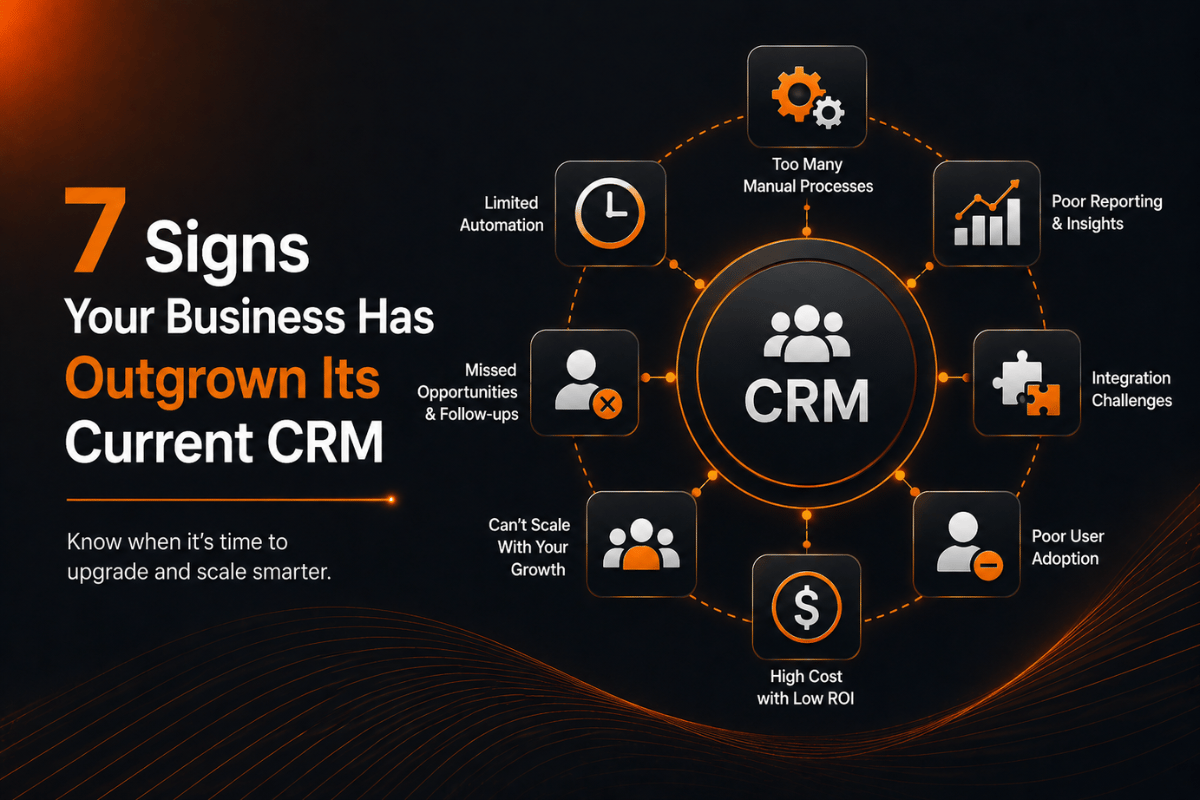
Here are seven signs that your current CRM system may no longer be keeping up with your business.
1. Your Team Has Started Using Spreadsheets Again
One of the earliest signs of an outdated CRM system is when employees begin creating their own spreadsheets to manage information that should already exist inside the CRM.
Sales representatives may maintain separate lead lists. Managers may create Excel reports because the CRM reporting tools are difficult to use. Customer service teams might keep their own notes because finding information inside the system takes too long.
These workarounds may appear harmless at first, but they create fragmented customer data. Different employees can end up working with different versions of the same information, making it harder to know which records are accurate.
A modern CRM system should provide a centralized source of customer information. When spreadsheets become necessary for everyday operations, it is worth examining whether your existing platform still matches your business processes.
How do you know if you have outgrown your CRM?
Ask a simple question: How much work happens outside the CRM to compensate for what the CRM cannot do?
If employees regularly export information, manually update spreadsheets, maintain separate databases, or create workarounds, your CRM may no longer be supporting your organization effectively.
2. Manual Work Is Replacing Automation
As companies grow, repetitive administrative work becomes increasingly expensive.
A growing sales team may need to assign leads, send follow-up messages, update customer records, move opportunities between pipeline stages, and generate reports. If these tasks require constant manual intervention, employees spend valuable time maintaining the system instead of focusing on customers.
Effective CRM automation can reduce repetitive work by triggering actions based on defined rules and customer activity. For example, a new lead can automatically enter a workflow, receive a relevant message, and be assigned to the appropriate sales representative.
When your CRM has limited automation capabilities, employees may compensate with manual processes.
This is more than an inconvenience. Repetitive tasks can increase the risk of missed follow-ups, inconsistent data, and delayed customer communication.
How CRM automation improves business processes
Automation becomes especially valuable when the same action happens repeatedly.
Instead of asking employees to remember every follow-up or manually update every record, the system can handle predictable steps automatically. This allows teams to focus more attention on conversations, decision-making, and customer relationships.
If your business has grown significantly but your CRM automation has remained basic, it may be time to reconsider your current setup.
3. Your CRM Does Not Connect with the Tools You Use
Businesses rarely operate with a single software platform.
Your CRM may need to communicate with email marketing tools, accounting software, customer support platforms, communication applications, websites, e-commerce systems, or internal business applications.
When these systems cannot communicate effectively, information becomes scattered across multiple platforms.
This creates CRM integration problems that can slow down workflows and force employees to transfer information manually.
For example, a customer may submit information through your website, but the sales team might still need to enter that information into the CRM manually. Similarly, a sales representative may close a deal in the CRM while another department has no automatic way to receive the relevant information.
A scalable CRM should fit into your broader technology environment rather than operate as an isolated database.
4. Reporting Takes Too Much Time
Business leaders need reliable information to make decisions.
Which leads are converting? Which sales representatives are performing well? Where are opportunities getting stuck? Which customers are most valuable? How long does it take to move a prospect through the sales pipeline?
Your CRM reporting should help answer these questions without requiring hours of spreadsheet manipulation.
If employees regularly export CRM data, manually clean it, combine multiple files, and build reports from scratch, the problem may not be your team. The system itself may have reached its practical limits.
Strong CRM reporting should make business information easier to understand.
Real-time visibility is particularly important as organizations become larger. Managers should be able to see meaningful trends without depending entirely on manually prepared reports.
5. Your Customer Data Is Becoming Difficult to Manage
As your customer base grows, data management becomes more complicated.
Your CRM may contain thousands of contacts, leads, opportunities, interactions, and historical records. Without effective processes, duplicate records can appear, outdated information can remain in the database, and important customer details can become difficult to locate.
Poor CRM data quality can affect almost every department.
Sales teams may contact the wrong person. Marketing teams may send irrelevant campaigns. Customer service representatives may not have access to the latest interaction history. Managers may make decisions based on incomplete information.
How can you improve CRM data quality?
The solution is not always replacing the platform immediately.
Businesses can begin by identifying duplicate records, establishing consistent data-entry standards, reviewing inactive information, and defining who is responsible for maintaining customer records.
However, if your current CRM makes effective CRM data management extremely difficult, these problems may indicate a deeper scalability issue.
6. Your Team Is Struggling to Adopt the CRM
A CRM can have hundreds of features and still fail if employees do not want to use it.
Poor CRM adoption is often a symptom of friction. If the interface is complicated, workflows do not match real business processes, or employees need too many steps to complete basic tasks, users may avoid the system.
They might keep customer notes in personal documents, communicate through disconnected tools, or delay updating records until the end of the week.
That creates an important question:
What are the signs of an outdated CRM?
An outdated CRM is not necessarily one that looks old. It can be a system that no longer fits how your employees actually work.
Common warning signals include low usage, inconsistent data entry, frequent complaints about the interface, excessive manual processes, and employees relying on external tools to complete routine tasks.
Before replacing the system, businesses should determine whether the issue is training, configuration, usability, or genuine platform limitations.
7. Your CRM Cannot Scale with Business Growth
Perhaps the biggest sign that you have outgrown your CRM is that your business has changed faster than the system.
A growing organization may add new sales teams, products, locations, customer segments, workflows, and reporting requirements. The CRM that supported a small operation may struggle to handle these new demands.
This is where CRM scalability becomes critical.
A scalable CRM should accommodate increased users, larger databases, more complex workflows, additional integrations, and evolving business processes without creating unnecessary friction.
How do you make a CRM scale with your business?
The first step is understanding what is actually limiting growth.
Some businesses need better configuration. Others need additional integrations or automation. In more complex situations, organizations may need a different CRM platform or a customized solution designed around their workflows.
The objective should not simply be to purchase more software. It should be to create a system that can support the next stage of business development.
What Happens When a CRM No Longer Fits Your Business?
Ignoring CRM limitations can create costs that are difficult to see on a software invoice.
Employees spend more time entering data. Sales representatives miss follow-ups. Managers wait for reports. Teams duplicate information across different systems. Customers may receive inconsistent communication.
Over time, these small inefficiencies can become significant operational problems.
This is why customer relationship management should be viewed as part of the company's broader operating infrastructure rather than simply a tool for storing contact information.
A CRM should help connect people, processes, customer data, and business decisions.
Should You Upgrade or Replace Your CRM?
Not every CRM problem requires replacement.
If the platform has the required capabilities but has been poorly configured, an upgrade, workflow redesign, additional integration, or better training may solve the problem.
If the platform consistently prevents your team from automating important processes, connecting essential systems, accessing reliable data, or scaling operations, replacement may make more sense.
Should you upgrade or replace your CRM?
Compare the cost of fixing the existing system with the cost of continuing to work around its limitations.
Consider implementation requirements, data migration, employee training, integrations, customization, and long-term maintenance. A cheaper short-term option can become expensive if it continues generating manual work.
When Is a Custom CRM Needed?
A custom CRM can make sense when a company's workflows are sufficiently specialized that conventional platforms require too many compromises.
Custom CRM development allows businesses to design workflows, data structures, permissions, integrations, dashboards, and automation around their actual operations.
However, customization should not automatically be treated as the best solution. Standard CRM platforms can be highly capable and may be more practical when business requirements are relatively common.
The better question is whether your business needs flexibility that an existing platform cannot reasonably provide.
Final Thoughts
Recognizing that you have outgrown your CRM is not necessarily a sign that your original technology decision was wrong. It can simply mean that your business has evolved.
The important thing is to identify the warning signs early.
If spreadsheets are replacing your CRM, manual work is increasing, integrations are missing, reporting is difficult, customer data is becoming unreliable, employees are avoiding the platform, or the system cannot scale with your growth, it may be time to reassess your CRM strategy.
The right CRM should support your current operations while giving your business room to grow. A technology system should remove friction from growth, not become another obstacle standing in its way.